
Lecture
Week six lecture is on the topic, end note. End Note is a referencing data base which helps you to reference your work. It is essential to reference your work to enable readers to distinguish your work from some one else's work you may have used. End Note formats quote referencing and your bibliography, which are sometimes difficult to format right as different types of sources require a different format. End Note allows you to choose what type of source you need to reference, such as websites, books and journal articles and the correct format for that particular source is displayed for you. EndNote can be used in two ways, firstly as a standalone program or intergraded into MS Word. You can download EndNote from the ECU library online.
Workshop
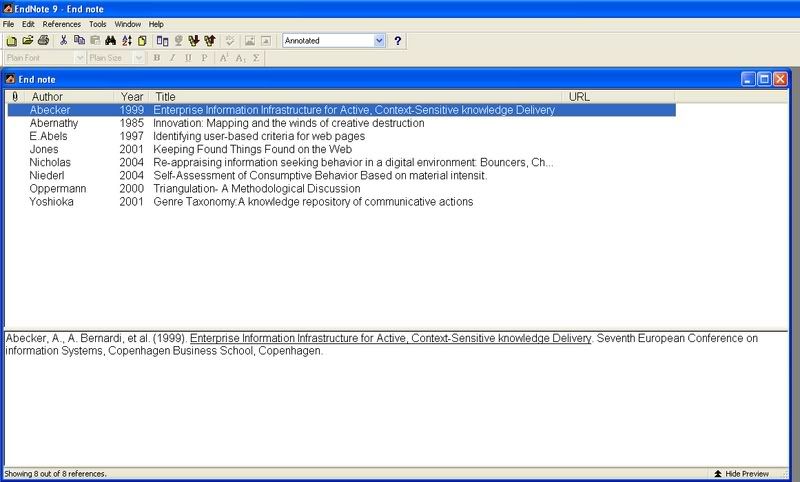
End Note is a program which is very expensive to buy, but as ECU students you can download it for free. Week six's lecture is on learning how to use End Note. You will firstly have to download endnote onto your computer if you have not already done so, or if you are on the university computers it will already be downloaded onto the computers. You just simply have to go to the ECU library online and type EndNote in the search box in the top right hand corner; don’t forget to change the user to student. From there you will be able to get into End Note. Once you are in EndNote you then have to use the EndNote references exercise, found on blackboard as the information to type in. The references are confusing and are hard to distinguish what source they belong to. You need to know what type on source the reference is for EndNote to work successfully. If you are unsure of the source type have a look through the ECU referencing guide or visit the referencing guide online at the ECU library. The image below is an example of what EndNote looks like.

No comments:
Post a Comment