October 29, 2007

Week 12

Lecture
Social and ethical issues is the topic for week 12. There are many copyright right problems on the internet because there are no standards enforceable and anyone can publish anything which can be bias and unethical. The main area where copyright is done is music, movies, images and written information. Plagiarism at university is a serious issue so be sure to reference your work correctly.
Protecting your PC is essential when using the internet as viruses can be time consuming for you, costly and annoying. To avoid viruses start by installing Firewall. Firewall will protect against probes and unsolicited monitoring.
It is also recommended that you install Anitvirus software, but keep it up to date as viruses change and are able to permeate the antivirus software. Viruses are usually contracted by attachment files on chat lines, instant messaging and emails. The high risk attachments include *.doc, *.xls, *.com, just to name a few. The lower risk files include *.jpg and *.pdf, however all are unsafe.
Some tips to minimize the risk:
• When on the internet never give personal information out such as bank details and passwords
• Don’t reply to SPAM mail
• Set online programs such as internet browsers, ICQ and MSN to maximum security settings
• Update your antivirus software weekly
• Always scan documents with antivirus before you open them.

Workshop
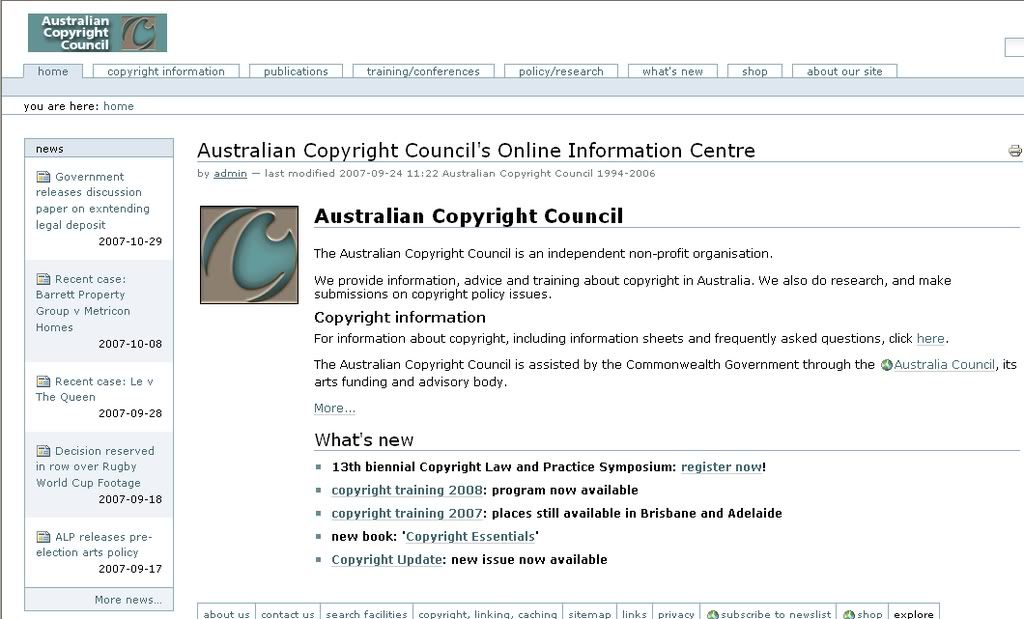
The workshop for week 12 gives more information on copywrite. The task is to visit the Australian Copyright Council at www.copyright.org.au. You then have to click on pages containing the information sheets and make a list of the information sheets that are relevant to undergraduate students and then read the information.

The image below is the home page of www.copyright.org.au

Information that's relevant to undergraduate students:

1. Copyright protects Textual material - ie journals, books, websites, articles.

2. Protects artistics works, dramatic works, musical works, films, soundrecordings, broadcasts. Basically anything original is copyright.

3. Copyright does not protect an idea, information, concepts or styles of a person that is supposingly 'unique'.

4. Anyone that wishes to use material that is under copyright cannot unless they seek and recieve permission from the author or artist of suggested material.

5. Most things on the net are copyrighted - this does not make them free. As students, we often think that material on the net is free to use, but it is actually under copyright and you are breaking the law if you do.

You then have to look at the Department of justice's Intellectual Property cases and write a summary of the US vs Sankas case.

Property cases at www.cybercrime.gov/ipcases.htmThe article titled Warez Leader Sentenced to 46 Months the case of a man called John Sankus Jr and his imprisonment for 48 months after being found guilty for conspiring to violating the criminal copyright laws. He was the leader of one of the oldest and largest international software piracy rings on te internet. Another member was sentenced to 33 months in prison. These two sentences are the longest ever imposed for orgainsed crime via the internet.

His online software piracy group was called DrinkOrDie which "cracked" software and then released it on the internet. Sankus's group cracked material from big names such as Microsoft, Adobe, Autodesk, Symantec and Novell. They managed to permanently defeat copyright protections which allowed the software to be illegally reproduced, distributed and used by anyone.

There were 40 people worldwide that were targeted by this undercover operation. Only nine defendants have pleaded guilty and two have been sentenced with another five pleading guilty this week.There were a couple of more sites we were asked to look at and write down in our logs what we can do to protect ourselves from being attacked via the internet, in forms or viruses, hackers and trojans.

Then you need to make a plan to protect yourself from attacks on your privacy and security.

1. Change the system ID- use a better password, not your name or something easily guessed.

2. Disable identifier broadcaster- don't shut to the world you have wireless-its an invitation for hackers.

3. Enable encyption

4. Restrict unnecessary traffic - inbuilt firewalls can help protect you.

5. Change the default administator password- default passwords are easy to get.

6. Patch and protect your PC's- install antivirus software.To protect yourself from viruses, make sure to install antivirus software in you computer.


Readings
There are readings for week 12, however i was unable to access them.

Week 11

Lecture
Week 11 lecture is based around data, information and knowledge and how they are all related. Data is factual, non judgmental and has no intrinsic value or meaning. Data is often in the form of statistics and measurable data such as the weather or share prices. Information has meaning, is relational, summative but has uncertain value. Information has more written work then data as information would generally summarize data. Knowledge is judgmental, subjective and is very valuable. Knowledge has more written work then both data and information.
The relationship between data, information and knowledge:
• Data – individual facts or proposition. On their own they have little value but can build into information.
• Information – a collection of facts that establishes trends and precedents in order to generate.
• Knowledge – how human experience and wisdom in applied to information in order to make sense of it.

Workshop
The workshop activity for week 11 is defining the words 'data', 'information' and 'knowledge'. I found the definitions at www.dictionary.com.
Data
1. a plural of datum
2. (used with a plural verb ) individual facts, statistics, or items of information: These data represent the results of our analyses. Data are entered by terminal for immediate processing by the computer.
3. (used with a singular verb ) a body of facts; information: Additional data is available from the president of the firm.

Information
1. Knowledge derived from study, experience, or instruction.
2. Knowledge of specific events or situations that has been gathered or received by communication; intelligence or news. See Synonyms at knowledge.
3. A collection of facts or data: statistical information.
4. The act of informing or the condition of being informed; communication of knowledge: Safety instructions are provided for the information of our passengers.
5. Computer Science. Processed, stored, or transmitted data.
6. A numerical measure of the uncertainty of an experimental outcome.
7. A formal accusation of a crime made by a public officer rather than by grand jury indictment.

Knowledge
1. The state or fact of knowing.
2. Familiarity, awareness, or understanding gained through experience or study.
3. The sum or range of what has been perceived, discovered, or learned.
4. Learning; erudition: teachers of great knowledge.
5. Specific information about something.
6. Carnal knowledge

Understanding the relationship between data, information and knowledge is useful to know at university. This is because when researching a topic for an assignment you need to do a lot of research and most of that research should be on finding data, then information then your knowledge from the research you have done can be added.

Five organizations that rely on data, information and knowledge from customers.
1. Banks- To give customer better service.
2. Transperth- To see where busses and trains are needed.
3. Subway- To give customers what they want, for example more variety of foods and better service.
4. Telstra - for better what there company does and increase customers.
5. Hospitals - to help make patients comfortable when staying in hospital.

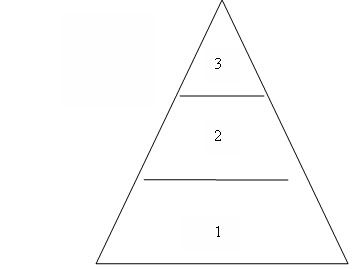
Another task for week 11 is to draw a representation of data, information and knowledge using MS Word. Below is my representation.


• 1= Data
• 2= Information
• 3= Knowledge


Week 11 Readings
Two of the readings for week 11 describe in different ways the relationships and explanations of the words data, information and knowledge. The website www.systems-thinking.org.dikw.dikw.htm said that data was symbols, information is the data processed to be useful and provides answers to who, what, where when questions, and knowledge is the application of data and information and answers the how questions.
The text written by Tim Mullaney I found was the most useful as I was able to clearly understand the difference between data, information and knowledge. He used an example of how we look at the weather. If the temperature 24 degrees were measured it doesn’t really mean anything other than at a particular place and time it was 24 degrees. But if that data is teamed with more information such as the different temperature all year round it becomes more useful and relationships can be made. From this information knowledge can be formed by making relationships for example from the information given we could assume that in winter temperatures are lower than summer temperatures.
http://camellia.shc.edu/literacy/index.html is a site where you are able to do quizzes which are very useful to UCP0004. The quiz I chose to do was on evaluating the world wide web. These quizzes will be helpful for exam revision.

Week 10

Lecture
Week 10 lecture gives information about online libraries and data bases. At university online libraries can be very useful when researching. The advantages on using these resources are that they are available to you 24 hours a day, 7 days a week; the journals are up to date, its convenient and note taking is made much easier as you can copy and paste. The types of online libraries include journal articles, text repositories, electronic books, artwork and music. Some of the many online journals include www.nationalgallery.org.uk, www.ogla.net and www.classicbookshelf.com. Using these online resources do however have their limitations, many libraries are subscription only so non members have to pay to use the site, in most cases only the catalogue is available online so the entire work can not be accessed and music and art works are not the original so resolution may be reduced.

Online data bases are similar to online libraries as they are available all the time, journals are current and note taking is much easier online. An online data base is organized information characterized by the use of data fields that provide procedural methods of retrieving information. Different websites cater for different information so if you were wanting to look up a health issue it would be best to go to an online data base which of a health nature. Some of the different types of online data bases include people searches, maps and atlases, government information and statistics and news and media. The negative aspects of data bases are that there can be an overload of information, it can be hard to navigate, there is a lot of advertising and data bases can also be subscription only.

Online libraries and data bases are similar in that they provide relevant, current and authentic information. They are different as online libraries provide information which is owned by a specific library where as online databases provide information found in periodicals such as magazines, journals and newspapers. All in all they are great ways to find information quickly and easily.

Workshop

Today in the workshop we were asked to go to the ECU library webpage at www.ecu.edu.au/library and record ten useful functions and give a brief explanation.

1. "Information resources" - The subheadings allow you to enter many other functions within this function. These include the Library Catalogue, Online Databases, Resources by Faculty, Virtual Reference Collection, and Internet Search Tools.

2. "Learning Assistance" - This heading also has subheadings which include Liberty: Learning to Find Information and the ECU Referencing Guide.

3. "Information About" - This has the subheading ECU Library which provides students with information about the facilities at the ECU Library.

4. "Resources For" - Subheadings include Students, Researches, Academic Staff, External/offshore Students, Community and Alumni.

5. "Services" - Some services include Multimedia Services, Document Delivery and Loans Services.

6. "Search the Catalogue" - this handy services allows you to enter either the author, title, publication details or even the lecturer and it will search the database for you.

7. "Information for Students" - This link allows you to chose from many options on what information you need, whether it be about the library trading hours or external library services.

8. "Online database" - This allows you to search journal articles on the net through the Uni database.

9. "ECU Reference Guide" - This link to the referencing guide allows you to access on the net the reference guide and gives information how to write an appropriate guide.

10. "Loan Services" - This link tells you everything you need to know about how to borrow from the ECU library.

The second task is to access www.medlineplus.com and spend time looking at articles about health and drugs. One of the health issues which I searched using the built in search engine, was breast cancer. As I am a female I need to be fully aware of the risks of breast cancer and how to minimize my risk. From researching breast cancer on this site I found out that 1 in 8 women will be affected by breast cancer in their lives and that men can also get breast cancer.
On this site you also have to option to view interactive tutorials which gives in depth information on the chosen health topic. I feel that this site would be beneficial for doctor and nurses to parents and students. Parents can log on and search for say chicken pox so they can get extra information to help their children, students can use this credible information for assignment and people in the health industries can refresh their memories on certain health issues. All in all, this site caters for a vast range of people looking for information on health topics.

The image below is the site I visited

Week 9

Lecture
When looking for information on the web it can be very frustrating as there is so much information, much of it irrelevant. To quickly find authentic, accurate and relevant information on the web it is useful to use search engines. Search engines search documents on the web for specified keywords and returns a list of the documents where the keywords are found. Typically, a search engine works by sending out a spider to fetch as many documents as possible. Another program, called an indexer, then reads these documents and creates an index based on the words contained in each document.
To use a search engine efficiently it is best to read the tips or help information on each search engine. When searching a topic it is best to use several key words in the search to narrow the search down. It is also recommended to use the different search tools to also help with narrowing down the search.
The problems with search engines are that they don’t filter out outdated information; there is no way to limit lower rank pages and broken pages are still included in searches.
There are large numbers of different search engines interfaces which you can use. Some of them include:

• Google
• Turbo 10
• Dogpile
• Excite
• MSN search
• Go Network
• Clusty
• Web Wombat
All search engines help with finding the relevant information you are looking for, with some providing different tools to one another. It is for this reason that you should chose a search engine which you feel most comfortable using.

Workshop

The task for week 9 is to visit http://monash.com.spidap.html and list four strategies that will help with structuring a good search, these include:

1. Keep the search precise.
2. Use + - in the search to limit unnecessary information.
3. Using “ ” will help in narrowing what you want.
4. Putting certain words in characters will limit the search as words such as NOT will tell the search engine you do not want something.

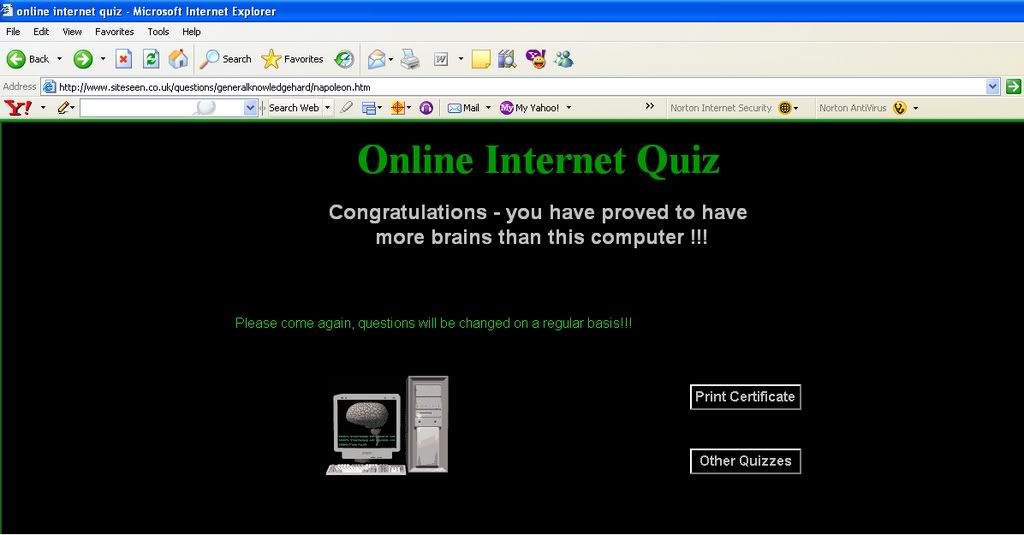
The second task is to complete an online internet quiz found at http://www.siteseen.co.uk/questions/generalknowledgehard/. There are 20 questions which need to be researched by using a search engine to find the correct answer. You must get the correct answer before you can move on to the next question.

The image below is of my results sheet


Readings
There are four different readings provided in week 9 with each of them going into different aspects of search engines. The site http://www.virtualsalt.com/howlook.htm explains why search engines are necessary as the web is so large and finding relevant information can be very difficult without a search engine. The second site http://www.monash.com/spidap.html gives a helpful guide on the most efficient way to search. For example they say that using several key words will help with finding the most useful information on the topic you are looking for. http://searchenginewatch.com/resources/article.php/2156611 is a site also gives information on how to use search engines better. This page provides a guide to key material within Search Engine Watch, resources across the web and articles written about searching better. The final readings come from the site http://www.let.leidenuniv.nl/history/ivh/chap4.htm, this site gives information on search engines, data bases, directories, a brief history of the web, library catalogs and how to find information on the net. All sites are very useful in providing useful information on search engines and how to use them efficiently.

Week 8

Lecture
Week 8 lecture gives information on evaluating and finding authentic information on the web. As there is no quality control on the web anyone can publish anything on the web. This has been the reason for the introduction of information to assist people in examining websites authenticity.

The criteria which can help with evaluating websites include:
• Accuracy- Is there an editor who verifies or checks the information?
• Authority- Is there an author and do they have credentials in the area?
• Objective- Does the page show bias?
• Currency- Is the page dated?
• Coverage- Is the information in depth?

If there aren't any of these on the web page it is likely that the page is not a useful source of information. Being aware that websites can be produced by anyone, even primary school children will hopefully make you analyze websites before you use the information

Workshop
Week 8 workshop is on determining the authenticity of a website. On the website http://www.ithaca.edu/library/training/think.html provides some useful information on how do determine if the website is accurate or not. ICYouSee gives six main suggestions on examining a website.

1. Making sure you are in the right place is necessary as the web is full of useful and useless information which can mean it can take hours to find what you are looking for. Asking yourself will I find information on the net quicker and that is more accurate than in a book can spare you hours of browsing.

2. When in doubt, doubt. Anyone can put what they like on the web so if information doesn’t seem quite right, then don’t use it as it is most likely false information. Look for manipulative and bias information as the full facts may not be given.

3. Consider the source. If the there is no author to the website then the information is likely to be incorrect as the author is not confident in what has been written to give their name. It is best to have an author who has credentials in the area which they are writing on.

4. Know what's happening. Being aware of the main purpose of the site, whether it is to inform, persuade or sell will give you better judgment on its content.

5. Look at the details. Details such as the date it was published or revised, spelling and grammar can show you if the information is current, accurate and written by someone educated.

6. Distinguish web pages from pages found on the web. Many government agencies and libraries no longer give paper documents or subscriptions but now commonly produce online versions of these. Determine where the source came from and if it was originally meant for the internet.

7.
http://www.ithaca.edu/library/training/think60.html

The second task is to evaluate two websites coming from http://www.ithaca.edu/library/training/think60.html
using the criteria accuracy, authorship, purpose, detail and design and overall worth.

The Almost Great Society: The 1960's
Accuracy- the site seems to be very accurate as I am unable to find any spelling or grammar mistakes and the information such as the date of Martin Luther King Jr is correct.

Authorship-Stanley K. Schultz, Professor of History and William P. Tishler, Producer.

Purpose-to educate people on the two domestic agendas Ellison had in mind: civil rights and the War on Poverty. We will look at President Johnson's philosophies and political methods, explore how civil rights protestors convinced him to act in the interest of African-Americans, and discuss the consequences of the civil rights legislation that Congress passed during his administration.

Detail and design-all the information was on one page which was set out well and easy to read.

Overall worth- the information seems accurate, the grammar and spelling looks to be correct and the author has ample knowledge on the subject as he is a professor of history. This site is a useful source of information.

Psychedelic 60s

Accuracy- the site is accurate and there it is not bias as it gives information about a lot of the issues which were around in the 1960's

Authorship-. The site is produced by the University of Virginia.

Purpose- to educate people on the many different issues which were around in the 1960's

Detail and design- The site has headings which have 60 style colours and patterns and there are several magazines published in the 1960's which relate to the issues.

Overall worth- A good site with a lot of information covering many different issues.

Week 7

Lecture
Week sevens lecture is all about the World Wide Web (www), who created it, what is it and what you can do with it. The www was developed by Tim Berners in 1989; the reason for this development was to facilitate sharing research information. The web is useful in so many ways you can chat to people on the opposite site of the world for a very small price; you can shop online and you can obtain just about any information you are looking for.

There are some common misconceptions between the web and the net. People often refer to the web and the net as being the same thing, however this is not true. Without the net there would be no web. The net is basically the connection to the web. On the net you find computers but on the web you find music, videos and information. Also on the net connections are between cable and computers but the web connections are to hypertext links.

Web addresses are used to determine one site from the other. Web addresses is made up of several parts, for example, http://www.ecu.edu.au
• http:// = hypertext transfer protocol
• WWW = World Wide Web
• ecu = server
• edu = domain
• au = country

The web can be very useful however anyone is able to publish what they want on the web, be that true or false. By looking at the domain of a website you can generally determine if the site will be reputable or not. For example .com is commercial, .org is an organization, .net is a network, .edu is educational, of these domains .edu and .org would generally be the most trustworthy sites. This is because they are generic top level domains.

To be able to explore the web you need a web browser program. These programs include Internet Explorer, MyIE2 (Maxthon), Neoplanet, Netscape and firefox. All of these browser interfaces are similar and offer variants of similar tools for searching the web. All programs are designed to do the same thing so choosing one really depends on what you feel comfortable using.


Workshop
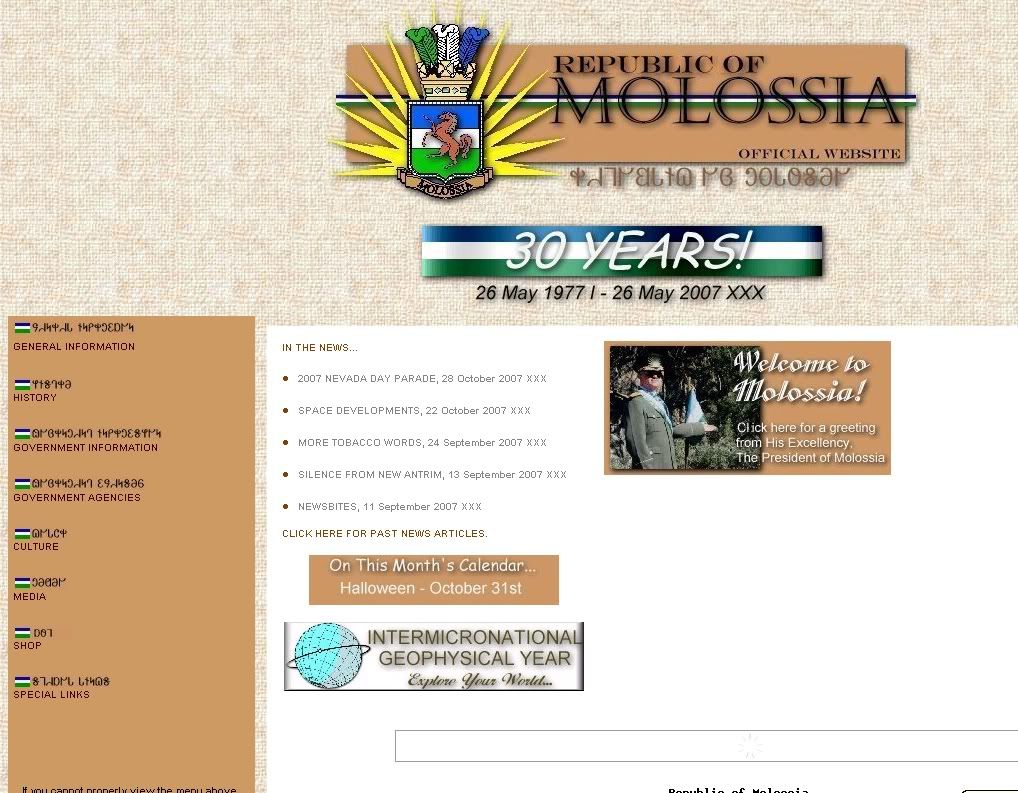
The web is filled with so much information with a lot of it incorrect. The task for week 7 is to determine whether the sites www.haggis.scotsman.com and www.molossia.org are authentic sites or not.

www.haggis.scotsman.com
1. Haggis is not an animal like the website says it is, but is sheep heart, liver and lungs mixed together with spices.
2. The webcam is not a camera but just photographs of locations around cities.
3. There is online shopping but it is fake as you can not purchase anything.
4. There are haggis facts which are incorrect and absurd. For example "There is a mistaken belief that the haggis is some kind of pudding made from sheep innards."


www.molossia.org


1. Molossia is not a real country, but the website states that it is an "independent nation, located in and completely surrounded by territory of the United States".
2. The photo of the so called president looks fake and just a man dressing up in military clothing.
3. The flag which represents the so called republic of Molossia is just a made up flag.
4. There are immature quotes from the "president", "you've got the same damn pants to get happy in". This immaturity suggests that this site is a joke as it is unlikely that a president would ever speak like this in public.

The second task is to visit www.martinlutherking.org and give reasons to whether or not the site is authentic but before entering the site suggest if the site will be authentic by analyzing the web address.

www.martinlutherking.org

When first viewing the web address I instinctively thought that the site would be credible. This is because I saw that the domain was .org which is a top level domain. This suggests that the information on the site will be correct as it is an organization. Being an organization there is a lot more to lose if the information is not correct on the site compared to a single person who publishes incorrect information on a website ending with .com. What I thought I would find on the site was information on Martin Luther King's achievements, famous quotes he made and all about his life.

Once I entered the site I felt confident that my first assumptions about the authenticity of the site were correct. However once I looked more closely at the site and entered different locations on the site I soon realized that the site was actually false. The site suggested that Martin Luther King wasn’t a nice man as they said in an article that Martin Luther King was having sex with three White women, one of whom he brutally beat. The purpose of this site is to supposedly expose the real truth behind Martin Luther King’s life. The site is a satire that portrays a real hatred towards Martin Luther King by the writer.

Readings

The readings for week seven were on the history of the World Wide Web. Both sites gave in depth information on the origin of the WWW. On http://www.w3.org/History.html the site has a time line from 1945 to 1995 giving information of the first steps towards the internet. For example Doug Engelbart invented the mouse in the 1960's and Tim Berners-Lee wrote a notebook program in the 1980's. The site http://www.let.leidenuniv.nl/history/ivh/frame_theorie.html, also goes into detail of all the inventions which contributed to the making of the WWW. The site also gives information on different search engines, basic net data and the history of electronic mail.

September 10, 2007

Week Six

Lecture


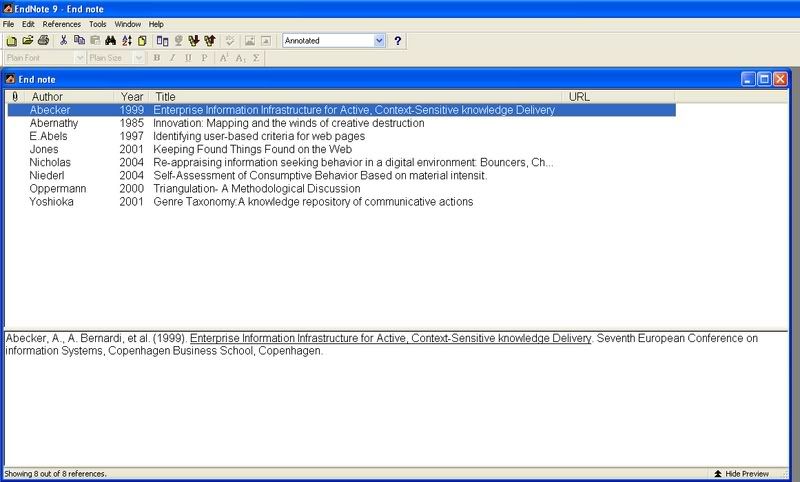
Week six lecture is on the topic, end note. End Note is a referencing data base which helps you to reference your work. It is essential to reference your work to enable readers to distinguish your work from some one else's work you may have used. End Note formats quote referencing and your bibliography, which are sometimes difficult to format right as different types of sources require a different format. End Note allows you to choose what type of source you need to reference, such as websites, books and journal articles and the correct format for that particular source is displayed for you. EndNote can be used in two ways, firstly as a standalone program or intergraded into MS Word. You can download EndNote from the ECU library online.

Workshop

End Note is a program which is very expensive to buy, but as ECU students you can download it for free. Week six's lecture is on learning how to use End Note. You will firstly have to download endnote onto your computer if you have not already done so, or if you are on the university computers it will already be downloaded onto the computers. You just simply have to go to the ECU library online and type EndNote in the search box in the top right hand corner; don’t forget to change the user to student. From there you will be able to get into End Note. Once you are in EndNote you then have to use the EndNote references exercise, found on blackboard as the information to type in. The references are confusing and are hard to distinguish what source they belong to. You need to know what type on source the reference is for EndNote to work successfully. If you are unsure of the source type have a look through the ECU referencing guide or visit the referencing guide online at the ECU library. The image below is an example of what EndNote looks like.